

2011年6月24日 星期五
MAC OS X上的 Beyond compare-like 應用程式
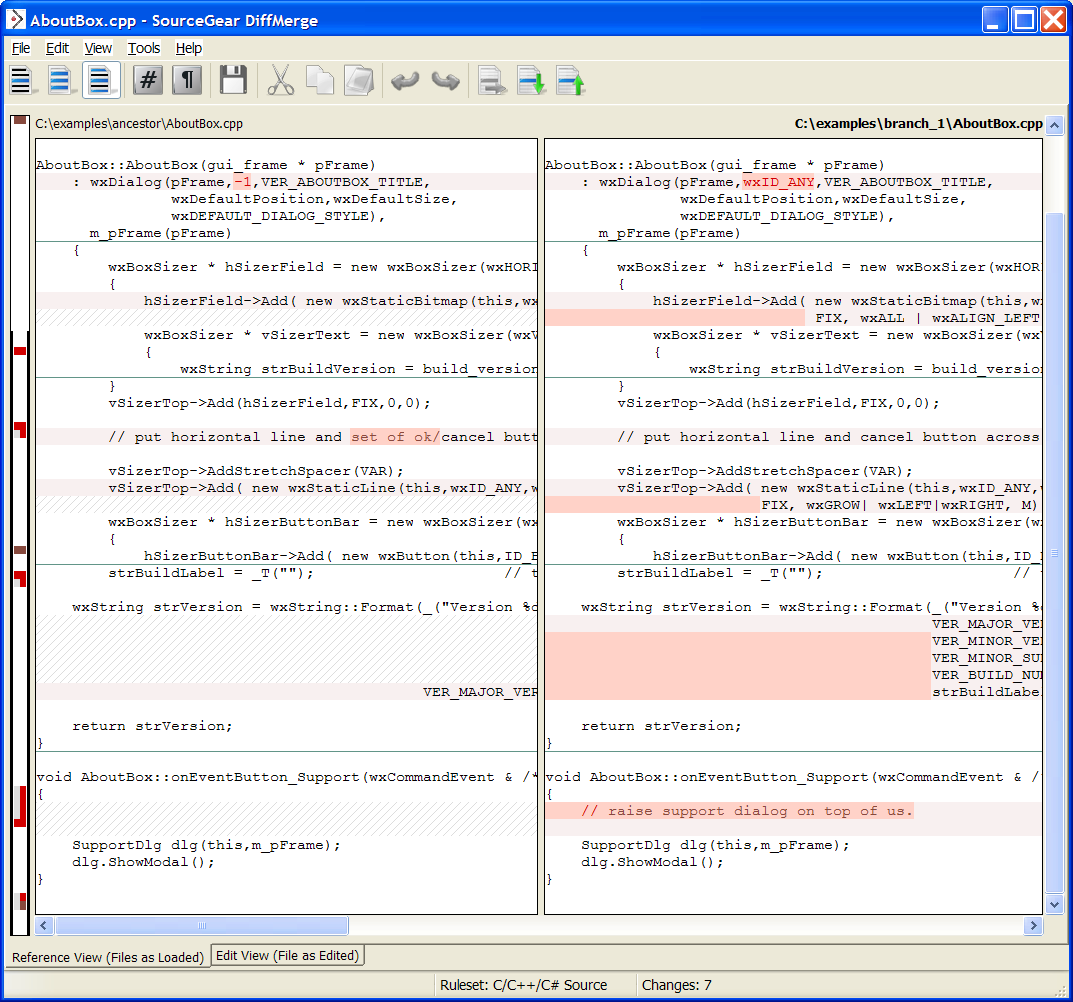
在MAC 寫程式 或是要比對文件所需的compare tool
找了很久 找到了一套免費的
DiffMerge
http://www.sourcegear.com/diffmerge/index.html
可以取代Win/Linux 上的 Beyond compare...(<--為啥你不出MAC版的)
推薦給您
2011年5月12日 星期四
Angry Birds 也可以在 Google Chrome瀏覽器上玩囉~

Angry birds 這個在 iPhone, Android平台上熱門的遊戲
現在也搬到 Google Chrome web 瀏覽器上玩囉
網址在此 https://chrome.google.com/webstore/detail/aknpkdffaafgjchaibgeefbgmgeghloj?hl=en-US#
要記得把網址打到 Google Chrome 瀏覽器上.
Google Chrome 瀏覽器下載網址:
http://www.google.com/chrome/index.html?hl=zh_tw&brand=CHMB&utm_campaign=zh_tw&utm_source=zh_tw-ha-apac-tw-sk&utm_medium=ha
2011年4月26日 星期二
計算檔案行數
通常想到計算檔案行數 第一個想到的就是 wc 這支command(在linux上)
wc 我猜是word count的簡寫...當然他不只可以算字數 也可以算行數
對於沒事想要看看自己程式碼寫了多少行或是多少字的人 是個方便的工具
先來看看他的help
#wc --help
Usage: wc [OPTION]... [FILE]...
or: wc [OPTION]... --files0-from=F
Print newline, word, and byte counts for each FILE, and a total line if
more than one FILE is specified. With no FILE, or when FILE is -,
read standard input.
-c, --bytes print the byte counts
-m, --chars print the character counts
-l, --lines print the newline counts
--files0-from=F read input from the files specified by
NUL-terminated names in file F;
If F is - then read names from standard input
-L, --max-line-length print the length of the longest line
-w, --words print the word counts
--help display this help and exit
--version output version information and exit
Report wc bugs to bug-coreutils@gnu.org
GNU coreutils home page:
General help using GNU software:
Report wc translation bugs to
簡單的說 要算某支檔案多少字 多少行 就用
#wc -w [file name] 或是 #wc -w * (表示目錄下所有檔案累計)
要算行數 也很簡單
#wc -l [file name] 或是 #wc -l * (表示目錄下所有檔案累計)
若是想要連sub-directory(所有子目錄都統計的話) 就用
#wc -l `find [folder name] -type f` 搭配find指令 可以視需求統計您需要的檔案類型
以上 應該是對於純文字檔比較適用
要用binary檔案來count 請自行想辦法~(阿 我也不知道你要count啥)
wc 我猜是word count的簡寫...當然他不只可以算字數 也可以算行數
對於沒事想要看看自己程式碼寫了多少行或是多少字的人 是個方便的工具
先來看看他的help
#wc --help
Usage: wc [OPTION]... [FILE]...
or: wc [OPTION]... --files0-from=F
Print newline, word, and byte counts for each FILE, and a total line if
more than one FILE is specified. With no FILE, or when FILE is -,
read standard input.
-c, --bytes print the byte counts
-m, --chars print the character counts
-l, --lines print the newline counts
--files0-from=F read input from the files specified by
NUL-terminated names in file F;
If F is - then read names from standard input
-L, --max-line-length print the length of the longest line
-w, --words print the word counts
--help display this help and exit
--version output version information and exit
Report wc bugs to bug-coreutils@gnu.org
GNU coreutils home page:
General help using GNU software:
Report wc translation bugs to
簡單的說 要算某支檔案多少字 多少行 就用
#wc -w [file name] 或是 #wc -w * (表示目錄下所有檔案累計)
要算行數 也很簡單
#wc -l [file name] 或是 #wc -l * (表示目錄下所有檔案累計)
若是想要連sub-directory(所有子目錄都統計的話) 就用
#wc -l `find [folder name] -type f` 搭配find指令 可以視需求統計您需要的檔案類型
以上 應該是對於純文字檔比較適用
要用binary檔案來count 請自行想辦法~(阿 我也不知道你要count啥)
2010年11月3日 星期三
[Android] 讓App或是System設定能夠寫入某Property的權限
找到 system/core/init/property_service.c
找到 struct {
const char *prefix;
unsigned int uid;
unsigned int gid;
} property_perms[] = {
裡如要加入某APP或System service可以寫入 "ABCD.XX.XX"的權限
加入
{ "abcd.xx.", AID_APP, 0 },
{ "abcd.xx.", AID_SYSTEM, 0 },
就可以啦
在此作個紀錄 以免每次都要再找或問人
2010年10月25日 星期一
[工作] Wireshake 使用筆記
記錄一下 最近用這東西抓封包
(1) 要filter 某IP 可以用 ip.src == xx.xx.xx.xx
(2) ip.src 是來源IP address.
(3) ip.dst 是目的IP address.
(4) udp.port == 1900 就可以filter SSDP的封包 抓upnp 的log很好用
紀錄一下
2009年12月7日 星期一
DLNA-回答上篇網友的問題
DLNA 是我在研究所的時候 所follow實作的一向數位家庭共通標準..
那時候guideline剛好在訂 教授也對這有興趣 所以就實作了一篇相關的論文
網友Alfrad問:
HC...你家裡有用過DLNA嗎?效果如何啊,是不是真如介紹所說的DLNA產品間不用什麼設定就可以相互傳輸資料。另外,我很好奇,要如何才能使電子產品具備DLNA功能呢?除了該產品本身一定要有網路連結功能外,是用寫程式的方式嗎?那是用哪種台平撰寫?可以解迷一下嗎?
我來一條一條回應一下好了 順便變成這篇文章
1. 我沒有買過任何相關dlna的產品, 不過現在好像越來越多廠商有出, ex: Sony的液晶電視,筆記型電腦 PSP, PS3; MS的Xbox360, 還有一些有貼上DLNA的NAS..接下來還有一堆PMP會支援這個標準
2. DLNA裡頭有規範auto-IP的測試項目, 基本上你拿到家裡的環境後,讓它自動取得IP address或是透過wireless的WPS(Wifi Protected Setup)功能來簡單按一個鈕讓裝置與WiFi AP配對來加入至家中的network環境上. 基本上只要能夠加到 Home LAN裡頭, 且遵照著DLNA的標準的device就能分享及互通這些多媒體格式.
3. 至於要怎麼具備DLNA的功能...這需要貴公司加入DLNA.org取得member或是買它的guideline(這應該不便宜). 遵照著裡頭要你去兜的function (如 UPnP 網路 protocol stack)
然後再拿去實驗室裡頭認證, 取得logo 就是一台具備dlna功能的device囉..詳細可能得到網路上google一下, reference超多的. http://www.dlna.org 協會的官網也有豐富的資料和他要達到的理念.
4. 至於用哪個平台...linux/win32 用 c/c++/java都有人implement. 有些很有名的open source 專案
在 http://elinux.org/DLNA_Open_Source_Projects 這個link你可以看到很多相關的內容..
5. 不曉得這樣子有沒有解謎了..
訂閱:
文章 (Atom)